> ## Documentation Index
> Fetch the complete documentation index at: https://sequence-0fb8d9e6-api_docs.mintlify.site/llms.txt
> Use this file to discover all available pages before exploring further.
# Mint Collectibles Using a Gasless Serverless Transactions API
> Learn how to mint collectibles using a gasless serverless Transactions API with Sequence. Implement the API on a Cloudflare worker for seamless user interactions without gas payments.
Time to complete: 20-30 minutes
The Sequence Transactions API can be implemented on a serverless [Cloudflare](https://cloudflare.com/) worker so a game or app user interaction is seamless without a confirmation signature or gas payment. You'll also benefit from not having to be worried about transaction speed, throughput and re-orgs by the relayer, and experience automatic scaling with Cloudflare.
The following steps will guide you through how to build your hosted minter API in 4 steps:
1. [Setup Cloudflare Environment with Wrangler Cli and Deploy a Test](/guides/mint-collectibles-serverless#1-setup-cloudflare-environment-with-wrangler-cli-and-deploy-a-test)
2. [Deploy, Sponsor & Update Metadata for an ERC1155 Contract with Sequence Builder](/guides/mint-collectibles-serverless#2-deploy-sponsor-and-update-metadata-for-an-erc1155-contract-with-sequence-builder)
3. [Use EthAuthProof to Prevent EOA DDoS](/guides/mint-collectibles-serverless#3-use-ethauthproof-to-prevent-eoa-ddos)
4. [Mint a Collectible to Wallet](/guides/mint-collectibles-serverless#4-mint-a-collectible-to-wallet)
The result, a secure API with the following specs:
* HTTPS GET: returns blockNumber
* HTTPS POST(proof, address): mints a collectible & returns transaction hash
You need basic knowledge of wrangler cli, npm, and Sequence Builder in order to complete this implementation.
[Browse the full code here](https://github.com/0xsequence-demos/template-cloudflare-worker-sequence-transactions-api)
## 1. Setup Cloudflare Environment With Wrangler Cli and Deploy a Test
In order to create the project from scratch, first create a project with `mkdir`, `cd` into the project, and run `pnpm init` to create a `package.json`.
Next, make sure wrangler cli is installed in your project and set the `wrangler` keyword as an alias in your local bash session.
```shell theme={null}
pnpm install wrangler --save-dev
alias wrangler='./node_modules/.bin/wrangler'
```
Create an account on the [Cloudflare site](https://cloudflare.com/) and perform a login step to login to your Cloudflare dashboard to connect the Cloudflare platform to your local development environment.
```shell theme={null}
wrangler login
```
Once logged in, initialize the project in the directory by accepting one of the randomly generated project folder names provided that you like, and follow the prompts to initialize your git tracked typescript `"Hello World" Worker` application.
```shell theme={null}
wrangler init
```
To complete this step, you should press enter 4 times after `wrangler init` with the last 2 step answered as `No` to decline git versioning and deployment.
This will clone down a starter repository that can be used to deploy code to the cloud.
Local API Testing
At any point in the guide, you can use the `wrangler dev` command in the project folder for local testing
#### Deploy Test
Finally, `cd` into the randomly generated project folder, and perform a `wrangler deploy` command.
This should print a URL, which you can enter in the browser the URL `https://..workers.dev` to view the `Hello World!` result.
## 2. Deploy, Sponsor and Update Metadata for an ERC1155 Contract with Sequence Builder
To use the Transactions API, you'll need to upgrade your Billing to `Developer` for your project in Sequence Builder which can be with [this walkthrough](/solutions/builder/project-settings#5-billing-settings)
First, follow [this guide](/solutions/builder/contracts/deploy-an-item-collection) to deploy a contract.
Then, one must update the role access of the contract in the Builder to only receive requests from the minter wallet address, which can be done in 2 steps.
You can do this in Sequence Builder by providing `minter permission` to your `Sequence Wallet Transactions API Address`.
In order to know what the transactions API address you are working with is, one must first either:
1. Have one generated for you using this [app](https://sequence-ethauthproof-viewer.vercel.app/) by selecting your network, and generating a wallet key with the `generate local wallet` button (for demo purposes only)
2. `Recommended`: You can also print locally the account address produced from an EOA wallet private key using the following code snippet:
```ts theme={null}
import { Session } from "@0xsequence/auth";
import { ethers } from "ethers";
(async () => {
// Generate a new EOA
// const wallet = ethers.Wallet.createRandom()
// const privateKey = wallet.privateKey
// Or, use an existing EOA private key
const privateKey = "";
// Open a Sequence session, this will find or create
// a Sequence wallet controlled by your server EOA
const session = await Session.singleSigner({
signer: privateKey,
projectAccessKey: "access_key",
});
const signer = session.account.getSigner(1);
console.log(`Your transactions API wallet address: ${signer.account.address}`);
})();
```
To do so, open your project, navigate to the `Contracts` page, select your `Linked contracts` and under `Write Contract` tab expand the `grantRole` method.
Complete with the following details:
`bytes32 role`: `0x9f2df0fed2c77648de5860a4cc508cd0818c85b8b8a1ab4ceeef8d981c8956a6`
`address account`: ``
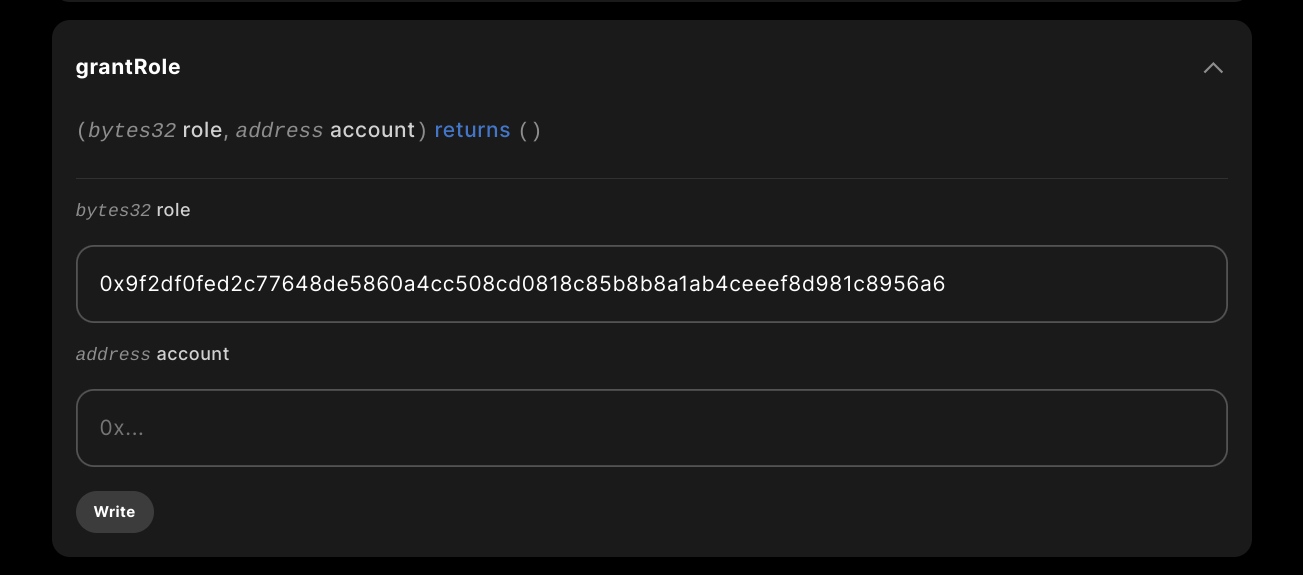 Where the `role` string inputted is the result of `keccak256("MINTER_ROLE")` in solidity or `ethers.keccak256(ethers.toUtf8Bytes("MINTER_ROLE"))` in javascript
This makes it so that only your specific address can mint from the contract, it will error otherwise.
Complete the role update by clicking `write` and sign the sponsored transaction.
#### Update Metadata
Next, you'll need to update the metadata with your media or assets for your contract, which can be done by [following this guide](/solutions/builder/collections/manage-item-metadata).
#### Contract Sponsoring
Finally, in order to sponsor the contract follow [this guide](/solutions/builder/gas-sponsorship) to sponsor a contract.
## 3. Use EthAuthProof to prevent EOA DDoS
Now that we have a contract deployed, we can return to the cloudflare worker directory and project, and install `ethers` and `0xsequence` to get access to sequence APIs in order to perform a proof validation that the request is coming from a trusted source, a sequence wallet.
```shell theme={null}
pnpm install 0xsequence @0xsequence/network
```
Then, we have to add a type of middleware, after we check if it's a POST or GET request. If it's a POST request, verify that the passed in `proofString` and `address` are valid, as well as the environment variables.
The code scaffold placed into `src/index.ts` would look like this, with `callContract` and `getBlockNumber` mocked out, using the mentioned verification step of calling `verify` before any contract call.
```ts theme={null}
import { sequence } from "0xsequence";
import { networks, findSupportedNetwork } from "@0xsequence/network";
export interface Env {
PKEY: string; // Private key for EOA wallet
CONTRACT_ADDRESS: string; // Deployed ERC1155 or ERC721 contract address
PROJECT_ACCESS_KEY: string; // From sequence.build
CHAIN_HANDLE: string; // Standardized chain name – See https://docs.sequence.xyz/multi-chain-support
}
// use the sequence api to verify proof came from a sequence wallet
const verify = async (
chainId: string,
walletAddress: string,
ethAuthProofString: string
): Promise => {
const api = new sequence.api.SequenceAPIClient("https://api.sequence.app");
const { isValid } = await api.isValidETHAuthProof({
chainId,
walletAddress,
ethAuthProofString,
});
return isValid;
};
async function handleRequest(
request: Request,
env: Env,
ctx: ExecutionContext
): Promise {
if (request.method === "OPTIONS") {
return new Response(null, {
headers: {
// Allow requests from any origin - adjust this as necessary
"Access-Control-Allow-Origin": "*",
// Allows the headers Content-Type, your-custom-header
"Access-Control-Allow-Headers": "Content-Type, your-custom-header",
// Allow POST method - add any other methods you need to support
"Access-Control-Allow-Methods": "POST",
// Optional: allow credentials
"Access-Control-Allow-Credentials": "true",
// Preflight cache period
"Access-Control-Max-Age": "86400", // 24 hours
}
});
}
if (env.PKEY === undefined || env.PKEY === "") {
return new Response("Make sure PKEY is configured in your environment", {
status: 400,
});
}
if (env.CONTRACT_ADDRESS === undefined || env.CONTRACT_ADDRESS === "") {
return new Response(
"Make sure CONTRACT_ADDRESS is configured in your environment",
{ status: 400 }
);
}
if (env.PROJECT_ACCESS_KEY === undefined || env.PROJECT_ACCESS_KEY === "") {
return new Response(
"Make sure PROJECT_ACCESS_KEY is configured in your environment",
{ status: 400 }
);
}
if (env.CHAIN_HANDLE === undefined || env.CHAIN_HANDLE === "") {
return new Response(
"Make sure CHAIN_HANDLE is configured in your environment",
{ status: 400 }
);
}
const chainConfig = findSupportedNetwork(env.CHAIN_HANDLE);
if (chainConfig === undefined) {
return new Response("Unsupported network or unknown CHAIN_HANDLE", {
status: 400,
});
}
// POST request
if (request.method === "POST") {
// parse the request body as JSON
const body = await request.json();
const { proof, address, tokenId }: any = body;
try {
// check that the proof is valid
if (await verify(env.CHAIN_HANDLE, address, proof)) {
try {
// mocked call
const res = await callContract(request, env, address, tokenId);
return new Response(`${res.hash}`, { status: 200 });
} catch (err: any) {
console.log(err);
return new Response(`Something went wrong: ${JSON.stringify(err)}`, {
status: 400,
});
}
} else {
return new Response(`Unauthorized`, { status: 401 });
}
} catch (err: any) {
return new Response(`Unauthorized ${JSON.stringify(err)}`, {
status: 401,
});
}
}
// GET request
else {
try {
// mocked call
const res = await getBlockNumber(env.CHAIN_HANDLE, request);
return new Response(`Block Number: ${res}`);
} catch (err: any) {
return new Response(`Something went wrong: ${JSON.stringify(err)}`, {
status: 500,
});
}
}
}
const getBlockNumber = async (
chainId: string,
request: Request
): Promise => {
return chainId;
};
const callContract = async (
request: Request,
env: Env,
address: string,
tokenId: number
): Promise => {
return { hash: "0x" } as any;
};
export default {
async fetch(request: Request, env: Env, ctx: ExecutionContext) {
// Process the request and create a response
const response = await handleRequest(request, env, ctx);
// Set CORS headers
response.headers.set("Access-Control-Allow-Origin", "*");
response.headers.set(
"Access-Control-Allow-Methods",
"GET, POST, PUT, DELETE, OPTIONS"
);
response.headers.set("Access-Control-Allow-Headers", "Content-Type");
// return response
return response;
},
};
```
#### Add Cloudflare Environment Variables
Then, pass in the environment variables for your build by updating the `[vars]` section in your `wrangler.toml`.
```
[vars]
PKEY = "" # Private key for EOA wallet
CONTRACT_ADDRESS = "" # // Deployed ERC1155 or ERC721 contract address
PROJECT_ACCESS_KEY = "" # From sequence.build
CHAIN_HANDLE = "" # // Standardized chain name – See https://docs.sequence.xyz/multi-chain-support
```
#### Implement Window Object in Wrangler Template
It should be noted, if you try to deploy this you'll get a missing `window` object required by the web3 modules.
To prevent this, add the following line to your `wrangler.toml` file to make the environment compatible.
```
...
node_compat = true # add this line
...
```
#### Testing the Deploy
You can now redeploy using `wrangler deploy`
And perform a curl request to test your endpoint like such:
```shell theme={null}
curl -X POST https://your-worker.your-subdomain.workers.dev \
-H "Content-Type: application/json" \
-d '{"proof": "", "address": "", "tokenId": 0 }'
... invalid proof string ...
# and if you replace with actual proof (from a wallet client login) and address on polygon, it should return
success
```
You can acquire your wallet address proof by using this [dapp](https://sequence-ethauthproof-viewer.vercel.app/) and follow the below steps.
#### Using the ETHAuthProof Viewer dapp
When you arrive on the page, the first thing you should do is select a network.
Then you have an option to either connect and generate the Proof, or, generate a local wallet
Where the `role` string inputted is the result of `keccak256("MINTER_ROLE")` in solidity or `ethers.keccak256(ethers.toUtf8Bytes("MINTER_ROLE"))` in javascript
This makes it so that only your specific address can mint from the contract, it will error otherwise.
Complete the role update by clicking `write` and sign the sponsored transaction.
#### Update Metadata
Next, you'll need to update the metadata with your media or assets for your contract, which can be done by [following this guide](/solutions/builder/collections/manage-item-metadata).
#### Contract Sponsoring
Finally, in order to sponsor the contract follow [this guide](/solutions/builder/gas-sponsorship) to sponsor a contract.
## 3. Use EthAuthProof to prevent EOA DDoS
Now that we have a contract deployed, we can return to the cloudflare worker directory and project, and install `ethers` and `0xsequence` to get access to sequence APIs in order to perform a proof validation that the request is coming from a trusted source, a sequence wallet.
```shell theme={null}
pnpm install 0xsequence @0xsequence/network
```
Then, we have to add a type of middleware, after we check if it's a POST or GET request. If it's a POST request, verify that the passed in `proofString` and `address` are valid, as well as the environment variables.
The code scaffold placed into `src/index.ts` would look like this, with `callContract` and `getBlockNumber` mocked out, using the mentioned verification step of calling `verify` before any contract call.
```ts theme={null}
import { sequence } from "0xsequence";
import { networks, findSupportedNetwork } from "@0xsequence/network";
export interface Env {
PKEY: string; // Private key for EOA wallet
CONTRACT_ADDRESS: string; // Deployed ERC1155 or ERC721 contract address
PROJECT_ACCESS_KEY: string; // From sequence.build
CHAIN_HANDLE: string; // Standardized chain name – See https://docs.sequence.xyz/multi-chain-support
}
// use the sequence api to verify proof came from a sequence wallet
const verify = async (
chainId: string,
walletAddress: string,
ethAuthProofString: string
): Promise => {
const api = new sequence.api.SequenceAPIClient("https://api.sequence.app");
const { isValid } = await api.isValidETHAuthProof({
chainId,
walletAddress,
ethAuthProofString,
});
return isValid;
};
async function handleRequest(
request: Request,
env: Env,
ctx: ExecutionContext
): Promise {
if (request.method === "OPTIONS") {
return new Response(null, {
headers: {
// Allow requests from any origin - adjust this as necessary
"Access-Control-Allow-Origin": "*",
// Allows the headers Content-Type, your-custom-header
"Access-Control-Allow-Headers": "Content-Type, your-custom-header",
// Allow POST method - add any other methods you need to support
"Access-Control-Allow-Methods": "POST",
// Optional: allow credentials
"Access-Control-Allow-Credentials": "true",
// Preflight cache period
"Access-Control-Max-Age": "86400", // 24 hours
}
});
}
if (env.PKEY === undefined || env.PKEY === "") {
return new Response("Make sure PKEY is configured in your environment", {
status: 400,
});
}
if (env.CONTRACT_ADDRESS === undefined || env.CONTRACT_ADDRESS === "") {
return new Response(
"Make sure CONTRACT_ADDRESS is configured in your environment",
{ status: 400 }
);
}
if (env.PROJECT_ACCESS_KEY === undefined || env.PROJECT_ACCESS_KEY === "") {
return new Response(
"Make sure PROJECT_ACCESS_KEY is configured in your environment",
{ status: 400 }
);
}
if (env.CHAIN_HANDLE === undefined || env.CHAIN_HANDLE === "") {
return new Response(
"Make sure CHAIN_HANDLE is configured in your environment",
{ status: 400 }
);
}
const chainConfig = findSupportedNetwork(env.CHAIN_HANDLE);
if (chainConfig === undefined) {
return new Response("Unsupported network or unknown CHAIN_HANDLE", {
status: 400,
});
}
// POST request
if (request.method === "POST") {
// parse the request body as JSON
const body = await request.json();
const { proof, address, tokenId }: any = body;
try {
// check that the proof is valid
if (await verify(env.CHAIN_HANDLE, address, proof)) {
try {
// mocked call
const res = await callContract(request, env, address, tokenId);
return new Response(`${res.hash}`, { status: 200 });
} catch (err: any) {
console.log(err);
return new Response(`Something went wrong: ${JSON.stringify(err)}`, {
status: 400,
});
}
} else {
return new Response(`Unauthorized`, { status: 401 });
}
} catch (err: any) {
return new Response(`Unauthorized ${JSON.stringify(err)}`, {
status: 401,
});
}
}
// GET request
else {
try {
// mocked call
const res = await getBlockNumber(env.CHAIN_HANDLE, request);
return new Response(`Block Number: ${res}`);
} catch (err: any) {
return new Response(`Something went wrong: ${JSON.stringify(err)}`, {
status: 500,
});
}
}
}
const getBlockNumber = async (
chainId: string,
request: Request
): Promise => {
return chainId;
};
const callContract = async (
request: Request,
env: Env,
address: string,
tokenId: number
): Promise => {
return { hash: "0x" } as any;
};
export default {
async fetch(request: Request, env: Env, ctx: ExecutionContext) {
// Process the request and create a response
const response = await handleRequest(request, env, ctx);
// Set CORS headers
response.headers.set("Access-Control-Allow-Origin", "*");
response.headers.set(
"Access-Control-Allow-Methods",
"GET, POST, PUT, DELETE, OPTIONS"
);
response.headers.set("Access-Control-Allow-Headers", "Content-Type");
// return response
return response;
},
};
```
#### Add Cloudflare Environment Variables
Then, pass in the environment variables for your build by updating the `[vars]` section in your `wrangler.toml`.
```
[vars]
PKEY = "" # Private key for EOA wallet
CONTRACT_ADDRESS = "" # // Deployed ERC1155 or ERC721 contract address
PROJECT_ACCESS_KEY = "" # From sequence.build
CHAIN_HANDLE = "" # // Standardized chain name – See https://docs.sequence.xyz/multi-chain-support
```
#### Implement Window Object in Wrangler Template
It should be noted, if you try to deploy this you'll get a missing `window` object required by the web3 modules.
To prevent this, add the following line to your `wrangler.toml` file to make the environment compatible.
```
...
node_compat = true # add this line
...
```
#### Testing the Deploy
You can now redeploy using `wrangler deploy`
And perform a curl request to test your endpoint like such:
```shell theme={null}
curl -X POST https://your-worker.your-subdomain.workers.dev \
-H "Content-Type: application/json" \
-d '{"proof": "", "address": "", "tokenId": 0 }'
... invalid proof string ...
# and if you replace with actual proof (from a wallet client login) and address on polygon, it should return
success
```
You can acquire your wallet address proof by using this [dapp](https://sequence-ethauthproof-viewer.vercel.app/) and follow the below steps.
#### Using the ETHAuthProof Viewer dapp
When you arrive on the page, the first thing you should do is select a network.
Then you have an option to either connect and generate the Proof, or, generate a local wallet
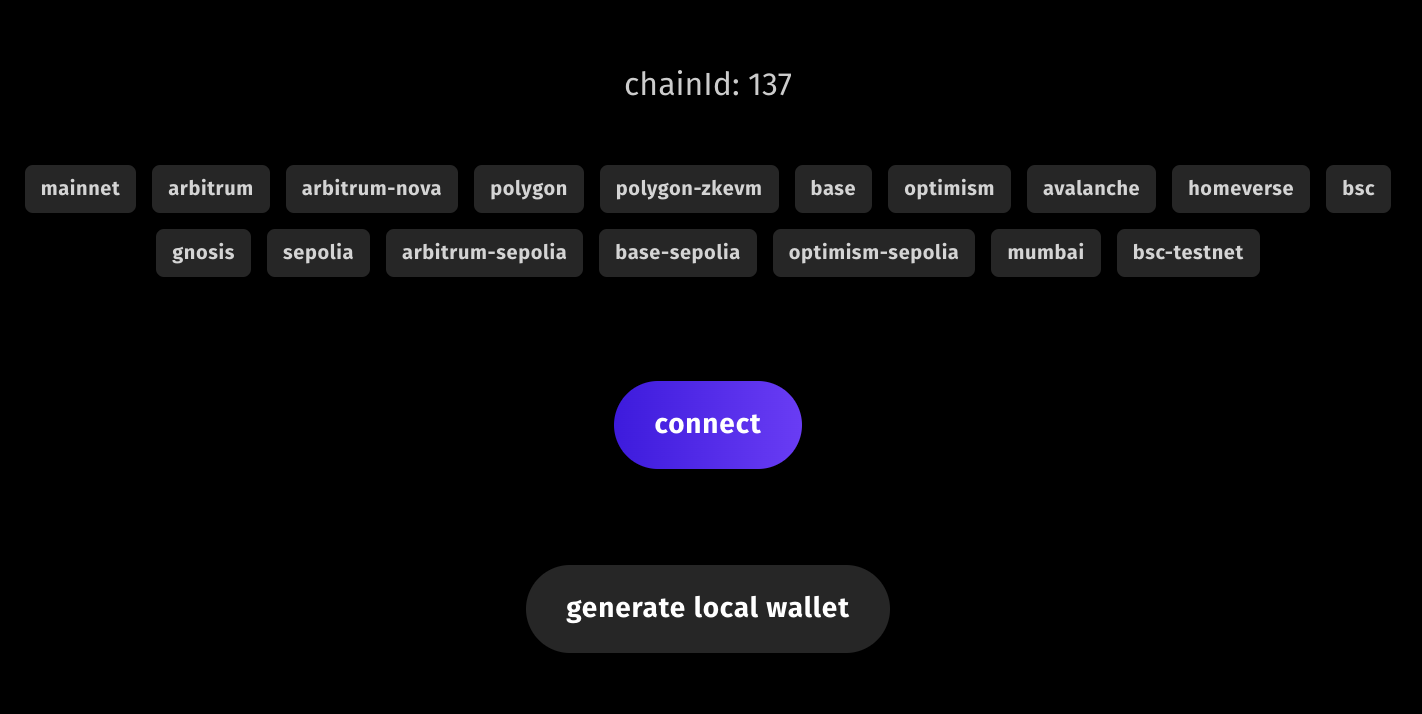 Press the `connect` button and then `copy to clipboard`.
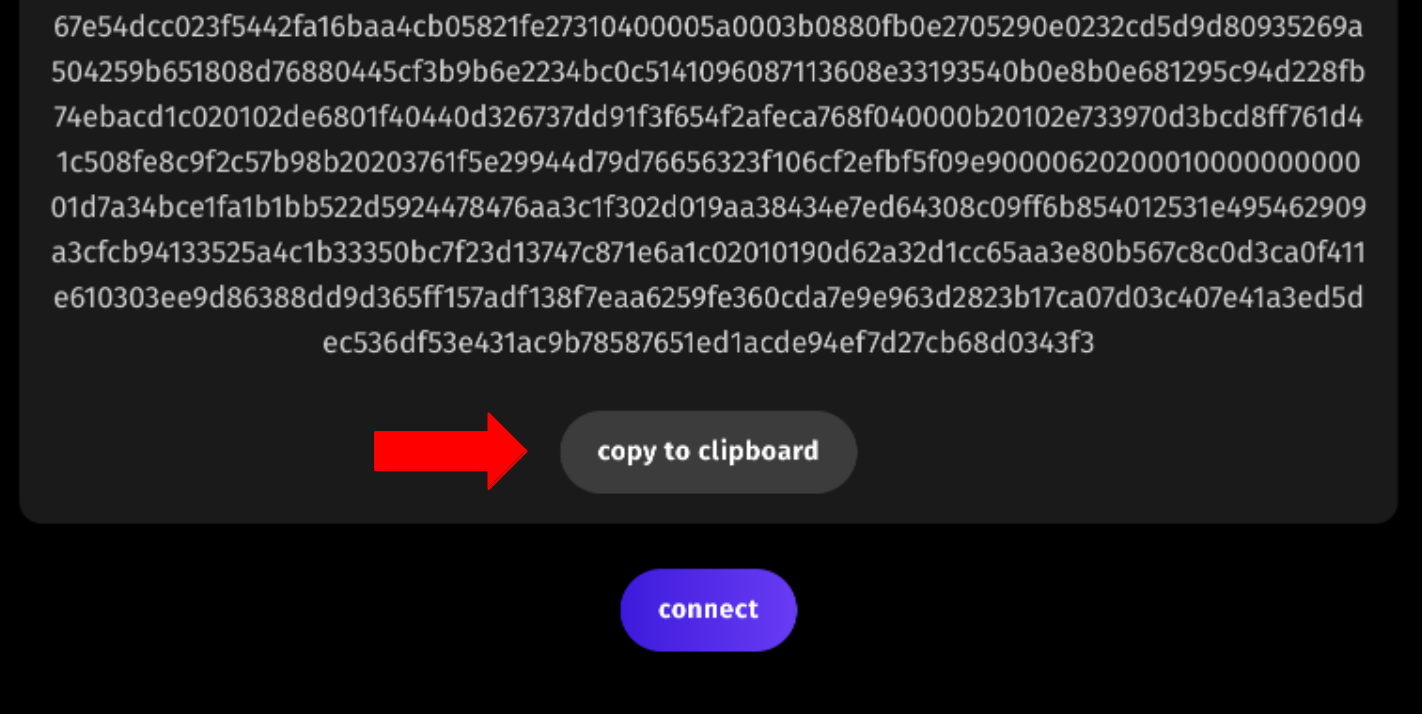 It should be noted, it is best not to share this `ETHAuthProof` with anyone as this means someone can prove ownership of your wallet and interact with specific APIs.
Finally, replace the `url` with your app from [this step](/guides/mint-collectibles-serverless#deploy-test), the `` with the generated value copied from the viewer app, and `` with your wallet address and it should return just the mocked `0x` string.
```shell theme={null}
curl -X POST https://your-worker.your-subdomain.workers.dev \
-H "Content-Type: application/json" \
-d '{"proof": "", "address": "", "tokenId": 0 }'
```
## 4. Mint a Collectible to Wallet
Finally, to deploy and mint a collectible from the sponsored contract address, we install the following packages
```shell theme={null}
pnpm install @0xsequence/auth ethers
```
and implement the `callContract` and `getBlockNumber` methods previously mocked out as follows:
```ts theme={null}
import { ethers } from 'ethers'
import { Session, SessionSettings } from '@0xsequence/auth'
...
const getBlockNumber = async (chainId: string, request: Request): Promise => {
const nodeUrl = `https://nodes.sequence.app/${chainId}`
const provider = new ethers.providers.JsonRpcProvider({ url: nodeUrl, skipFetchSetup: true })
return await provider.getBlockNumber()
}
const callContract = async (request: Request, env: Env, address: string, tokenId: number): Promise => {
const nodeUrl = `https://nodes.sequence.app/${env.CHAIN_HANDLE}`
const relayerUrl = `https://${env.CHAIN_HANDLE}-relayer.sequence.app`
const contractAddress = env.CONTRACT_ADDRESS
// instantiate settings
const settings: Partial = {
networks: [{
...networks[findSupportedNetwork(env.CHAIN_HANDLE)!.chainId],
rpcUrl: findSupportedNetwork(env.CHAIN_HANDLE)!.rpcUrl,
relayer: {
url: relayerUrl,
provider: {
url: findSupportedNetwork(env.CHAIN_HANDLE)!.rpcUrl
}
}
}],
}
// create a single signer sequence wallet session
const session = await Session.singleSigner({
settings: settings,
signer: env.PKEY,
projectAccessKey: env.PROJECT_ACCESS_KEY
})
// get signer
const signer = session.account.getSigner(findSupportedNetwork(env.CHAIN_HANDLE)!.chainId)
// create interface from partial abi
const collectibleInterface = new ethers.Interface([
'function mint(address to, uint256 tokenId, uint256 amount, bytes data)'
])
// create calldata
const data = collectibleInterface.encodeFunctionData(
'mint', [address, tokenId, 1, "0x00"]
)
// create transaction object
const txn = { to: contractAddress, data }
try {
return await signer.sendTransaction(txn)
} catch (err) {
throw err
}
}
```
Once these steps are complete, you can redeploy and test with the steps outlined in this [prior step](/guides/mint-collectibles-serverless#testing), and this time the POST request should return a transaction hash for the completed mint and the GET request would return a block number.
If you want to browse the full code, see [an example implementation here](https://github.com/0xsequence-demos/cloudflare-worker-sequence-transactions-api)
It should be noted, it is best not to share this `ETHAuthProof` with anyone as this means someone can prove ownership of your wallet and interact with specific APIs.
Finally, replace the `url` with your app from [this step](/guides/mint-collectibles-serverless#deploy-test), the `` with the generated value copied from the viewer app, and `` with your wallet address and it should return just the mocked `0x` string.
```shell theme={null}
curl -X POST https://your-worker.your-subdomain.workers.dev \
-H "Content-Type: application/json" \
-d '{"proof": "", "address": "", "tokenId": 0 }'
```
## 4. Mint a Collectible to Wallet
Finally, to deploy and mint a collectible from the sponsored contract address, we install the following packages
```shell theme={null}
pnpm install @0xsequence/auth ethers
```
and implement the `callContract` and `getBlockNumber` methods previously mocked out as follows:
```ts theme={null}
import { ethers } from 'ethers'
import { Session, SessionSettings } from '@0xsequence/auth'
...
const getBlockNumber = async (chainId: string, request: Request): Promise => {
const nodeUrl = `https://nodes.sequence.app/${chainId}`
const provider = new ethers.providers.JsonRpcProvider({ url: nodeUrl, skipFetchSetup: true })
return await provider.getBlockNumber()
}
const callContract = async (request: Request, env: Env, address: string, tokenId: number): Promise => {
const nodeUrl = `https://nodes.sequence.app/${env.CHAIN_HANDLE}`
const relayerUrl = `https://${env.CHAIN_HANDLE}-relayer.sequence.app`
const contractAddress = env.CONTRACT_ADDRESS
// instantiate settings
const settings: Partial = {
networks: [{
...networks[findSupportedNetwork(env.CHAIN_HANDLE)!.chainId],
rpcUrl: findSupportedNetwork(env.CHAIN_HANDLE)!.rpcUrl,
relayer: {
url: relayerUrl,
provider: {
url: findSupportedNetwork(env.CHAIN_HANDLE)!.rpcUrl
}
}
}],
}
// create a single signer sequence wallet session
const session = await Session.singleSigner({
settings: settings,
signer: env.PKEY,
projectAccessKey: env.PROJECT_ACCESS_KEY
})
// get signer
const signer = session.account.getSigner(findSupportedNetwork(env.CHAIN_HANDLE)!.chainId)
// create interface from partial abi
const collectibleInterface = new ethers.Interface([
'function mint(address to, uint256 tokenId, uint256 amount, bytes data)'
])
// create calldata
const data = collectibleInterface.encodeFunctionData(
'mint', [address, tokenId, 1, "0x00"]
)
// create transaction object
const txn = { to: contractAddress, data }
try {
return await signer.sendTransaction(txn)
} catch (err) {
throw err
}
}
```
Once these steps are complete, you can redeploy and test with the steps outlined in this [prior step](/guides/mint-collectibles-serverless#testing), and this time the POST request should return a transaction hash for the completed mint and the GET request would return a block number.
If you want to browse the full code, see [an example implementation here](https://github.com/0xsequence-demos/cloudflare-worker-sequence-transactions-api)